
Designing Power BI dashboards for production performance and cost analysis requires a clear alignment between high-frequency operational metrics, data model architecture, and financial reporting protocols. Engineering and finance teams must process large volumes of telemetry data to track operational efficiency, unit costs, and yield margins accurately.
Organizations evaluating their data strategy often start by defining what makes an effective Power BI dashboard for oil and gas production and costs. Establishing this foundation ensures that raw extraction rates, downtime logs, and expenditure entries map directly to strategic decision-making frameworks across operating assets.
What are the core dashboard design principles for production and cost analysis?
Core dashboard design principles require structuring data around a star schema model, isolating heavy calculations within DAX measures, and standardizing KPI visual layout. These practices prevent performance latency while delivering real-time visibility into production volumes, downtime, and operational expenditures.
Data modeling forms the backbone of any enterprise reporting system. Power BI operates most efficiently on a star schema, where central fact tables connect directly to dimensional tables such as date, asset location, and cost centers. Denormalizing data sources before loading them into the engine minimizes memory consumption and speeds up visual processing.
Visual hierarchy dictates how fast an executive or operations engineer digests information. The top banner must contain high-level metric cards showing key performance indicators (KPIs). The middle section should house trend lines and comparative charts, while the lower section provides detailed transactional tables.
KPI visualization requires strict consistency in color coding and formatting. Operational teams rely on uniform color scales to identify performance anomalies instantly across multiple field sites. Red indicates negative variances exceeding threshold limits, green represents targets met, and neutral tones display baseline metrics.
Performance optimization depends heavily on write-up efficiency in Data Analysis Expressions (DAX). Calculated columns consume persistent storage memory within the VertiPaq engine, whereas measures compute dynamically at query time. Technical leads must enforce the use of measures over calculated columns to keep report file sizes small and load speeds fast.
How do you map production volume tracking and cost per barrel metrics in Power BI?
Mapping production volume tracking and cost per barrel metrics requires aggregating daily fluid volumes against real-time operational expenses in a unified data model. The resulting measures divide total lease operating expenses by total barrels produced to yield accurate unit cost calculations.
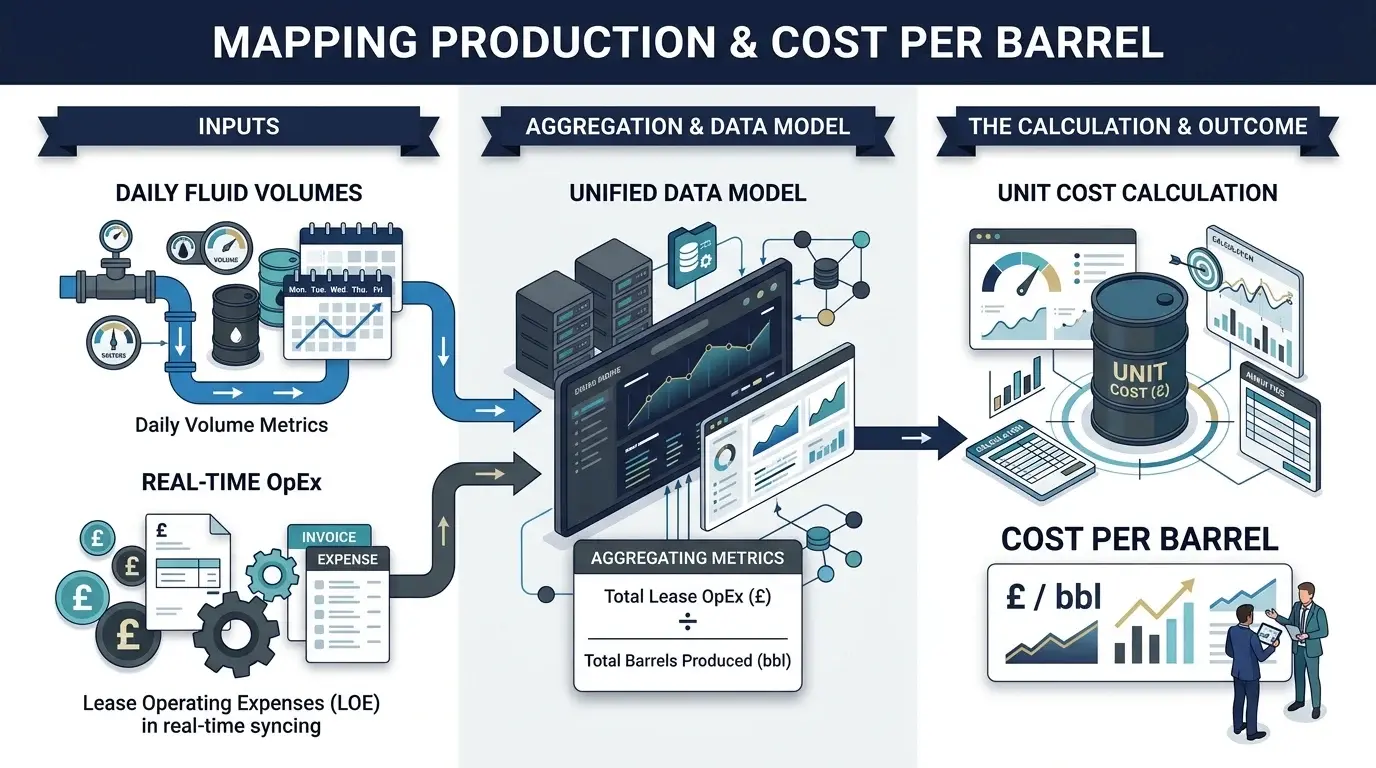
Production volume tracking relies on accurate daily measurement inputs from field SCADA systems, flow meters, and manual allocation logs. Integrating these disparate sources requires standardized units of measure across all field assets. Power BI integrates these data streams into time-intelligence calculations that yield daily, monthly, and year-to-date volume summaries.
Cost per barrel dashboard metrics demand a tight link between financial accounting structures and field operations data. General ledger entries from enterprise resource planning systems provide total operating expenses, which DAX measures divide by net production volumes.
To evaluate training options for technical teams building these tools, organizations review specialized programs like Power BI for Production & Cost Dashboards: Design Training Course. Structured skill development ensures data architects configure complex time-intelligence logic correctly without degrading query performance.
Budget versus actual visuals provide immediate feedback on financial variance across production facilities. Direct comparisons between target baselines and real-time costs allow asset managers to intervene before budget overruns compound. Bullet charts and waterfall visuals present these variances clearly without cluttering the user interface.
Calculating rolling averages stabilizes volatile daily production numbers. Field operations experience temporary shut-ins and maintenance cycles that distort single-day figures. Applying 7-day and 30-day moving averages in Power BI smooths out short-term fluctuations to reveal underlying operational trends.
What security and deployment configurations ensure safe report delivery?
Security and deployment configurations rely on Row Level Security (RLS) to restrict data access by user roles, organized Power BI workspaces for collaborative development, and dedicated app publishing for end-user distribution. Scheduled data refreshes and gateway configurations ensure automated, secure updates from on-premises sources.
Row Level Security restricts data access based on user credentials and organizational hierarchy. Field managers should only view data relevant to their specific operating assets, while regional executives require access to aggregated performance across all fields. RLS rules defined in Power BI Desktop filter the underlying data layer automatically for each user group.
Workspace and app deployment workflows maintain clear boundaries between development, testing, and production environments. Development workspaces allow engineers to build and test visual layouts, measure logic, and underlying queries. Publishing final versions through Power BI Apps presents business users with a clean, read-only interface free from development artifacts.
Scheduled data refresh schedules maintain data freshness across executive and operational reports. Field operations require multiple data refreshes daily to monitor real-time wellhead pressures and production throughput. Financial dashboards typically refresh on a daily or weekly schedule matching ERP batch processing cycles.
Gateway configuration bridges the gap between secure on-premises databases and the cloud-based Power BI Service. Enterprise gateways encrypt data transfers and manage user authentication securely without exposing internal networks to public access. Setting up redundant gateway clusters prevents processing bottlenecks during peak refresh hours.
Partner facing reporting requires strict governance protocols when sharing operational metrics with joint-venture partners or regulatory agencies. External users receive restricted app access or embedded report views that isolate authorized data fields while shielding proprietary financial models.
How do internal development, consulting, and formal training compare for dashboard creation?
Internal development relies on existing staff building reports, consulting transfers execution to external vendors, and formal training upskills internal teams to build sustainable in-house solutions. Selecting the optimal approach depends on internal technical capacity, project timelines, budget limits, and long-term maintenance requirements.
Internal development uses existing engineering, IT, or business intelligence personnel to build custom reporting solutions. This approach avoids external vendor procurement costs and leverages existing domain knowledge within the business. However, internal teams without specialized DAX and data modeling expertise often create slow, unoptimized dashboards that struggle to scale.
Consulting engagements provide rapid deployment by hiring external service providers to design and implement reports. External specialists bring proven technical frameworks and industry experience to the project. The primary downside is long-term dependency on third-party consultants for report updates, DAX maintenance, and model modifications.
Structured corporate training upskills existing engineering and finance personnel, combining technical mastery with institutional knowledge. Field teams learn to build, optimize, and maintain production performance tools independently. For comprehensive organizational enablement, teams implement Power BI for Production and Cost Dashboards Design Training by Institute For Oil & Gas Training to establish standardized report architectures across all operational divisions.
How should organizations choose a path for Power BI dashboard capability?
Selecting a capability path requires evaluating team technical maturity, long-term report maintenance costs, and project deployment timelines. Organizations facing urgent deadlines often hire consultants, while those prioritizing long-term data self-sufficiency invest in corporate workforce upskilling.
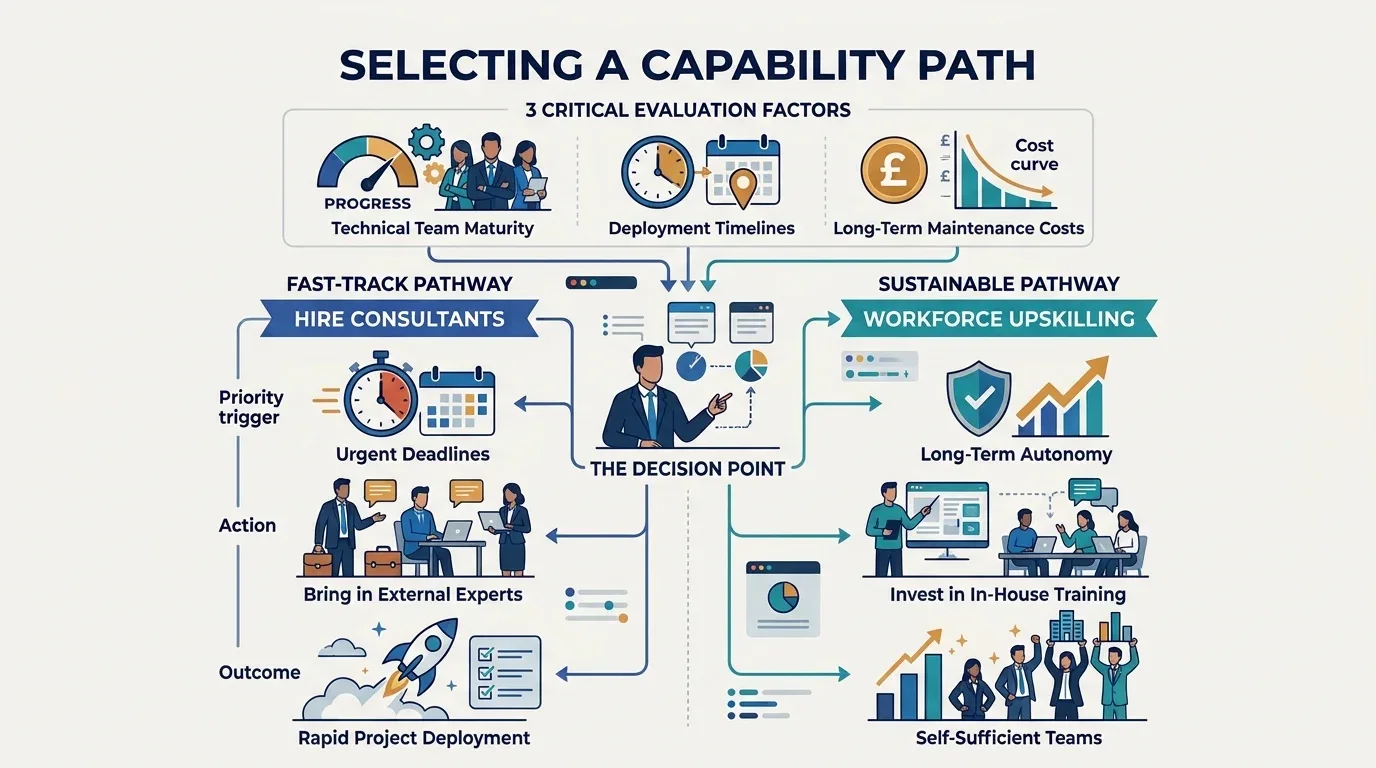
Decision-makers must evaluate the total cost of ownership across all implementation methods. While external consulting delivers quick initial builds, recurring maintenance fees and minor visual change requests accumulate significant costs over time. Building internal capability through structured learning requires an initial training budget but yields permanent operational savings.
Workforce skill gaps often cause project failures when deploying Power BI enterprise-wide. Non-technical staff members attempt to manage complex relational data models using flat-file spreadsheet logic. Investing in structured learning paths closes these skill gaps, ensuring staff members configure data refresh pipelines and security policies correctly.
Return on investment (ROI) from training manifests in reduced report processing time, faster decision cycles, and lower data infrastructure costs. Optimized Power BI data models reduce server processing loads and memory consumption, lowering cloud licensing expenses. Teams equipped with proper design frameworks build flexible systems that adapt quickly to changing operational parameters.
Evaluating organizational readiness involves assessing current data infrastructure, user access needs, and internal technical capability. Organizations that commit to structured upskilling build a self-sustaining data culture capable of delivering accurate, high-performance dashboards for years to come.
Frequently Asked Questions
What does Oil & Gas Petroleum Digital Finance & Automation training cover?
The Oil & Gas Petroleum Digital Finance & Automation course by the Institute For Oil & Gas Training covers automated financial reporting, Joint Interest Billing (JIB) automation, lease operating expense tracking, and ERP data integration. Participants learn how to streamline capital expenditure workflows, model upstream production economics, and implement robotic process automation (RPA) for energy accounting operations.
How does digital finance automation improve oil and gas financial management?
Digital finance automation replaces manual spreadsheet reconciliations with real-time data integration between SCADA field telemetry, joint venture accounting systems, and enterprise resource planning platforms. Through specialized training from the Institute For Oil & Gas Training, finance professionals learn to reduce reporting latency, eliminate accounting errors, and gain immediate visibility into unit production costs and field profitability.
Who should enrol in the Oil & Gas Petroleum Digital Finance & Automation program?
This program from the Institute For Oil & Gas Training is designed for petroleum accountants, financial controllers, joint-venture analysts, corporate finance managers, and energy sector IT professionals. It is tailored specifically for finance personnel who oversee hydrocarbon revenue accounting, capital budgeting, field cost control, and financial operations across upstream, midstream, and downstream assets.
How does automation help with Joint Interest Billing (JIB) and joint venture accounting?
Automation streamlines joint venture accounting by standardising operating agreement cost-sharing rules, automating cash call calculations, and distributing electronic JIB statements directly to non-operator partners. The Oil & Gas Petroleum Digital Finance & Automation curriculum provided by the Institute For Oil & Gas Training teaches energy accounting teams how to deploy automated audit trails and dispute resolution workflows to accelerate joint venture cash settlements.
What tools and technologies are used in energy finance automation training?
The Institute For Oil & Gas Training incorporates industry-standard financial modelling tools, business intelligence platforms like Power BI, advanced Python automation scripts, and energy-specific ERP financial modules into the Oil & Gas Petroleum Digital Finance & Automation course. Learners gain hands-on experience building automated financial dashboards, cost allocation pipelines, and predictive cash flow models designed for oil and gas operations.
Related training courses
ERP Systems for Oil & Gas: Access Controls Training Course
- Specialisation
- Oil & Gas Petroleum Digital Finance & Automation
- Duration
- 5 days · 13 CPD hours
Digital Transformation in Petroleum Finance: Strategy & Roadmap Training Course
- Specialisation
- Oil & Gas Petroleum Digital Finance & Automation
- Duration
- 5 days · 15 CPD hours
Automation of JV & PSC Reporting: Process Candidates Training Course
- Specialisation
- Oil & Gas Petroleum Digital Finance & Automation
- Duration
- 5 days · 15 CPD hours
More articles

Data Governance and Master Data Ownership and Standards Training by Institute For Oil & Gas Training
Evaluate the Data Governance & Master Data Ownership & Standards Training Course syllabus, delivery, outcomes, and enrollment requirements.
Read article →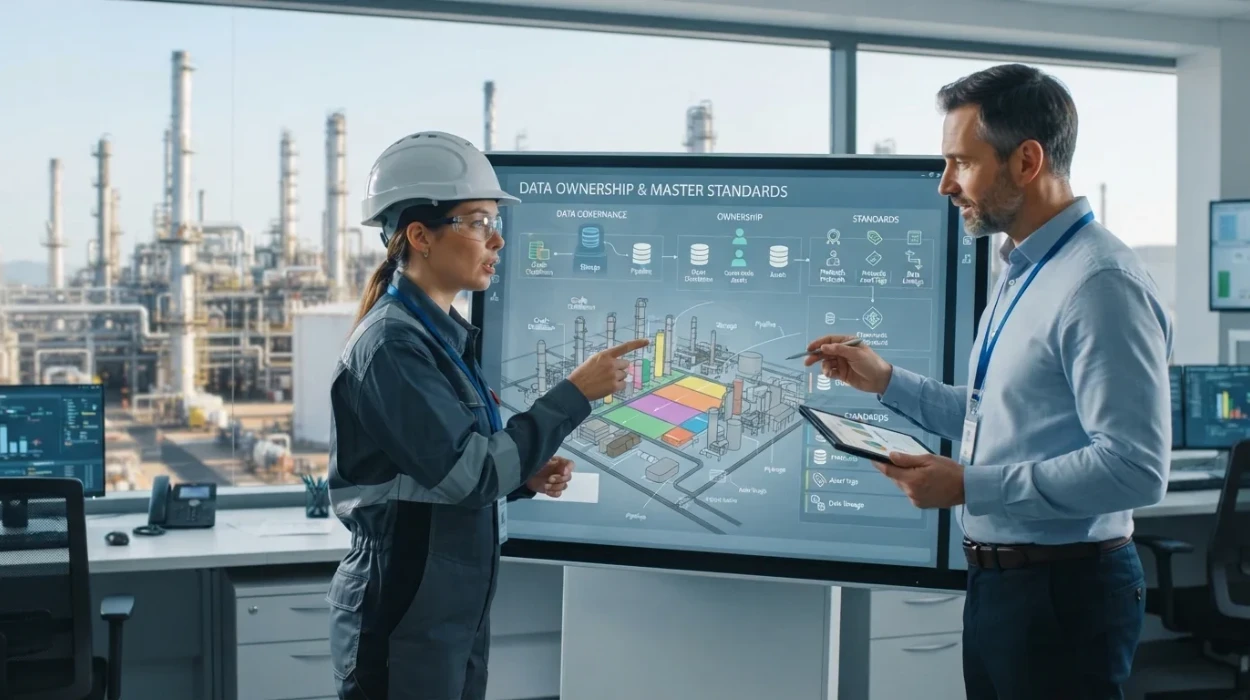
How to Define Data Ownership and Master Data Standards for Petroleum Operations
Learn how petroleum operations define data ownership, establish master data management standards, and improve data governance frameworks.
Read article →
Why Data Governance and Master Data Standards Matter in Oil and Gas
Learn why data governance and master data standards transform petroleum operations, resolve enterprise risk, and drive ROI across global energy assets.
Read article →